
World clocks for Mac · Early release
A little closer.
Everywhere.
Your colleague in London. Your family in Tokyo. Keep their time in your menu bar, without doing the maths.
Download for MacVersion 1.2.0 · macOS 14+ · Apple silicon and Intel.
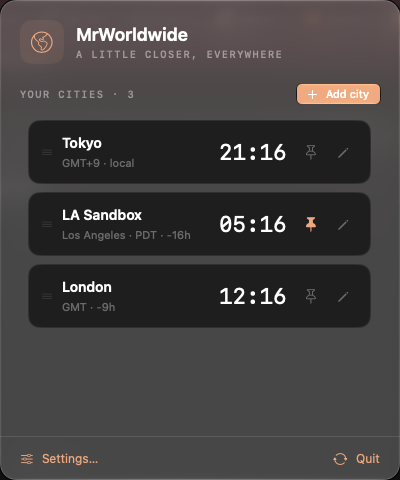
The places that matter.
One glance away.
Search for a city, give it a familiar name, and arrange the list your way. Pin the clocks you want in the menu bar.
Built as a small native Mac app, with keyboard-friendly controls and light and dark appearances.
Two cities free.
More for $1.
Pro adds unlimited cities with a one-time purchase. Use it on two personal Macs, with no subscription.
Signed by Noaa AB. Notarized by Apple.
This is an early release. Clean-Mac installation, installed updates, and macOS 14 / Intel runtime testing are still outstanding. Start with the two free cities before buying Pro.
Before you download
- How much does MrWorldwide cost?
- Two cities are free. Pro unlocks unlimited cities for $1 USD once, on two personal Macs. Purchase and activate Pro from the app. There is no subscription.
- Which Macs does it support?
- The app targets macOS 14 or later and includes both Apple silicon and Intel code. Current acceptance testing was on Apple silicon; minimum-OS and Intel runtime checks remain outstanding.
- Can I name clocks after people or teams?
- Yes. Give a city a nickname, reorder the list, and pin the clocks you want in your menu bar. City times use the Mac’s time-zone database, including daylight-saving changes.
- Do I need an account to use the free clocks?
- No. The free clocks work without a sign-in. A Pro purchase is handled by Polar, and a license key activates Pro on your Mac.
Set up your world clocks · Release notes · Download checksum